SprAIpaint
Status Quo

Our customer produces & paints industrial automation equipment, using manual spray-painting with 4 painters per shift. The current process involves manually painting a product that feature complex geometries with ribs and undercuts, making uniform coating application challenging.
Products are hung at different mounting points depending on their center of gravity, and single-stage paint is applied over pre-primed surfaces using a paint gun.
Goal
Develop an automated painting cell that can deal with complex geometries, and high variance in product configurations.
- Scan part geometries, because CAD data is not available for all product variants
- Automatically create painting paths using a "classic" algorithm, or a hybrid AI-based approach
- Ensure full surface coverage on complex geometries, while avoiding paint runs and overpainting
- Handle high variance in product configurations
State of the Art
Current research and existing solutions include:
- Fraunhofer Institute: Previously worked on similar automation but struggled with complex geometries (reference project)
- Academic Research: A lot of research exists on path planning, modeling paint application, and simulating robotic painting
- Commercial Solutions: Most industrial robot OEMs offer automated painting solutions, usually for parts with less variance and a focus on high-volume production
Proposed Solution
graph TB
    %% Styles
    classDef primary fill:none,stroke:#64CEE4,stroke-width:2px,rx:10px
    classDef defaultBackground fill:#f5f5f5,stroke:#f5f5f5,stroke-width:20px,rx:40px
    classDef primaryBackground fill:#C5F1F7,stroke:#C5F1F7,stroke-width:20px,rx:40px

    subgraph physicalSub["Physical System"]
        Product[Product Hanging on Rotating Jig]
        Robot[Robotic Arm]
        Scanner[3D Scanner]
        Paint[Paint Applicator]
        Table[Rotating Jig]
    end

    subgraph controlSub["Control Layer"]
        PLC[Industrial PLC]
        RobotCtrl[Robot Controller]
        TurntableCtrl[Rotating Jig Controller]
        ScannerCtrl[Scanner Controller]
    end

    subgraph aiSub["AI Workstation"]
        PathPlanning[AI Path Planning]
        ScanProc[Scan Processing]
    end

    ScanProc -->|Geometry Data| PathPlanning
    CAD[CAD Database] -.->|Reference Models| PathPlanning
    PathPlanning -->|OPCUA| PLC

    PLC -->|Control Signals| RobotCtrl
    PLC -->|Sync Commands| TurntableCtrl
    PLC -->|Trigger Commands| ScannerCtrl

    RobotCtrl -->|Motion Control| Robot
    TurntableCtrl -->|Rotation Control| Table
    ScannerCtrl -->|Scan Control| Scanner

    Scanner -->|3D Scan| Product
    Robot -->|Paint Application| Product
    Table -->|Positioning| Product

    Robot -.->|Mounted| Paint
    Robot -.->|Mounted| Scanner

    classDef physical stroke:#0277bd,stroke-width:2px,fill:#ffffff33
    classDef control stroke:#7b1fa2,stroke-width:2px,fill:#ffffff33
    classDef ai stroke:#388e3c,stroke-width:2px,fill:#ffffff33

    class physicalSub,controlSub,aiSub defaultBackground

    class Product,Robot,Scanner,Paint,Table physical
    class PLC,RobotCtrl,TurntableCtrl,ScannerCtrl control
class PathPlanning,ScanProc,CAD ai3D Scanner
| Solution | Accuracy | Speed | Cost | Integration Complexity | Constraints |
|---|---|---|---|---|---|
| MetraSCAN 3D (Robotic) | High | Fast | High (€100k+) | Low | Scan happens in one central location |
| Stereo Camera + VisionLib | Medium | Very Fast | Low (€1k-3k) | Medium | Requires CAD data of all variants |
| EinScan Pro HD (Handheld) | Medium | Medium | Medium (€15k-25k) | High | Process stability & speed may be lower than the other alternatives |
Industrial-grade scanners like the MetraSCAN 3D provide high precision and speed, ideal for complex geometries, but with a higher upfront cost.
Combining a stereo camera with a tool such as VisionLib offer a cost-effective solution if CAD data can be used for part positioning and path planning. Since CAD data is not available for all product variants, this approach is unlikely to work.
Handheld scanners like the EinScan Pro are cheaper, offer good precision, but are more complex to integrate into an automated system.
Any vision system in a painting application needs to be protected from paint particles, for example with air curtains, shutters, or physical separation of scanning & paint application.
Recommendation
Due to a lack of CAD data for all product variants, the recommended approach is to use a high-precision scanner like the EinScan or MetraSCAN 3D. The exact variant, and automation strategy will depend on integration constraints in the paint booth.
For example, a more expensive robotic scanner only makes sense if the scan happens before the ceiling-mounted convery system diverges into separate material flows.
Mounting the scanner system on the paint applicator could work in each paint booth, but scanning products with no fixed frame of reference (MetraSCAN 3D) or CAD data (VisionLib) could impact process stability.
Industrial Robot & Automation
As a first step, we would recommend using an existing industrial robot with a spray-painting attachment, and a retro-fitted scanner. A subset of products reach this robot painting station, suspended from a ceiling-mounted conveyor system.
The products need to be mounted in a rotating jig or on a turntable, to allow the robot to access all surfaces.
Alternatively, the robot itself could move on a linear axis. Combined with the movement of the conveyor, the robot could also reach all surfaces of the products in two steps.
Additionally, the robot needs to be integrated into the path planning with a PLC, and there needs to be a safety concept for automated operation.
Recommendation
For the robotic arm & associated parts, we would recommend using an existing supplier, with existing service agreements. Most suppliers offer robots for automated painting applications.
Path Planning
The path planning algorithm can be implemented using a combination of geometric analysis and AI-based techniques.
Initially, the algorithm could follow what workers do, by segmenting the part geometry into different surface types and applying appropriate painting strategies for each type.
| Geometry Type | Path Strategy |
|---|---|
| Flat surfaces | Raster path (zig-zag) perpendicular to faces |
| Cylindrical finned body | Helical or axial sweep with product rotation |
| Edges and transitions | Blend paths between surface types |
An AI-based path planning algorithm could be trained on a synthetic dataset of part geometries and a simplified physics model of the paint application, using reinforcement learning to optimize for uniform coverage and minimal overspray.
Even further down the line, new visual foundational models like V-JEPA 2 could simplify the approach by directly predicting optimal painting paths from a 3D camera feed.
Recommendation
We propose segmenting the part geometry into a small number of geometry types and applying predefined painting strategies for each type. The strategies are derived from manual painting techniques.
The architecture of SprAIpaint should enable AI-based systems in the future, since the pace of development suggests that future versions of V-JEPA or similar models will be able to handle complex robotic tasks.
Simulation, Training, and Synthetic Data
Developing a classic algorithm, or training an AI-based path planning algorithm requires a simulation environment, a physical model of the paint application, and a dataset of part geometries.
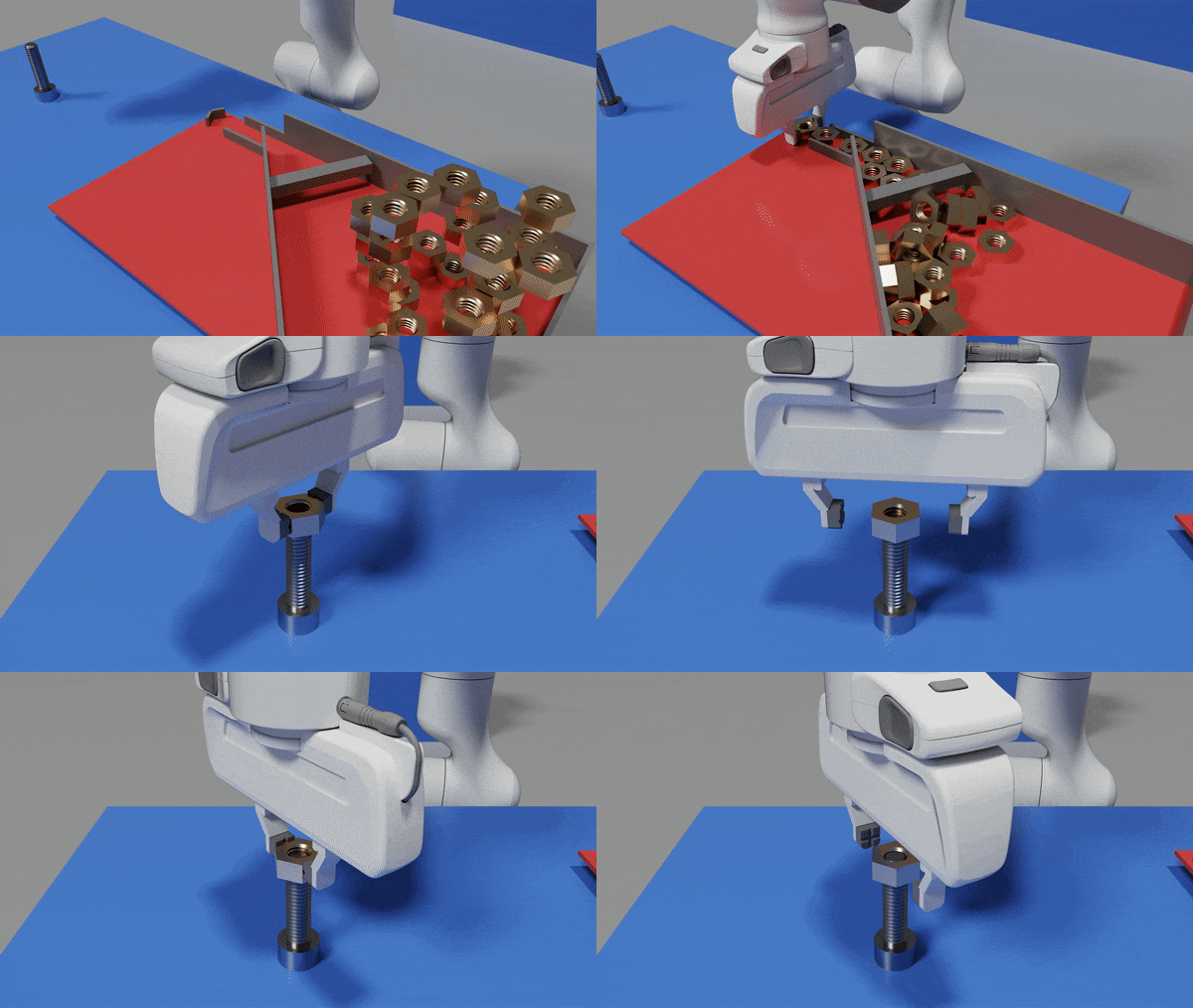
IsaacSim simulation of a Franka robotic arm learning to pick a bolt and screw it onto a bolt using reinforcement learning
Recommendation
To validate the recommended approaches, we propose building a simulation environment first, using NVIDIA Isaac Sim or similar.
Approach
We propose an iterative approach, under the assumption that the manual painting process can be automated with a combination of simulation, classic path planning algorithms, and AI-based image segmentation.
Virtual Environment & Path Planning
Build foundation for algorithm development and testing without hardware.
- Interview two expert painters, as well as automation experts with an automotive background from Motius' network
- Create high-fidelity simulation using NVIDIA Isaac Sim or similar
- Import representative geometries with all typical geometry types from the CAD database
- Implement a simple, cone-based paint flow simulation and surface coverage calculation
- Develop geometry-based algorithm using surface segmentation approach
- Validate coverage quality and cycle times in simulation
- Physics based vision simulation using Isaac Sim sensors
- Realistic robotic arm control in ROS2 and MoveIt
Deliverables: Working simulation environment, initial path planning algorithm, coverage metrics
Physical Prototype
Prove concept with real hardware in controlled environment.
- Assemble test cell with industrial robot, turntable, and 3D scanner
- Implement 3D scanning stage and post-processing of the point cloud data
- Port parts of the ROS2-based control into the robot PLC
- Iteratively improve path planning based on real-world results
Deliverables: Working lab prototype, validated path planning algorithms, initial safety protocols
Pilot Line Integration
Goal: Deploy industrial-grade system in the production environment.
- Interface with existing manufacturing execution systems
- Train personnel for system operation and maintenance
- Fine-tune performance
Deliverables: Pilot production line, trained operators, validated quality metrics
Scope of the Project
For the first project, our team will set up a virtual environment with physics-based simulation of the sensor and painting process. In this environment, the team will develop a path planning algorithm that gets executed on a simulated industrial robot.
The goal is to show that such a path planning algorithm can be developed in a short time period, and that it can recreate the manual painting process by segmenting products into different geometries and painting them accordingly.
ROI Analysis
The following analysis is meant to provide a rough estimate of the ROI for automating the painting process. The costs for an automated system are based on our experience in similar robotics & AI projects.
Note
Almost all parameters can be adjusted in the form below, the ROI results update automatically.